Failing Seagate Hard Drive: Data Recovered Before Total Failure in Carrara
A Carrara customer's hard drive was making noises and throwing errors. It was diagnosed as failing and the important files were recovered before the drive gave out completely.
The problem
The customer's laptop had started freezing and showing read errors, with occasional clicking and buzzing from the drive. They had important documents and family photos on it and no recent backup. A drive making noise and reporting errors can fail completely at any moment, so the priority was getting the data off safely before doing anything else.
Symptoms reported
- Clicking and buzzing noises coming from the drive
- System freezing and long pauses when opening files
- Read errors and files that would not open
- Slow or failed Windows startup
- No recent backup of important files
Diagnosis process
Before recommending parts or a full reinstall, Karma Techs followed a practical diagnostic process to confirm the likely cause and reduce the risk of unnecessary work.
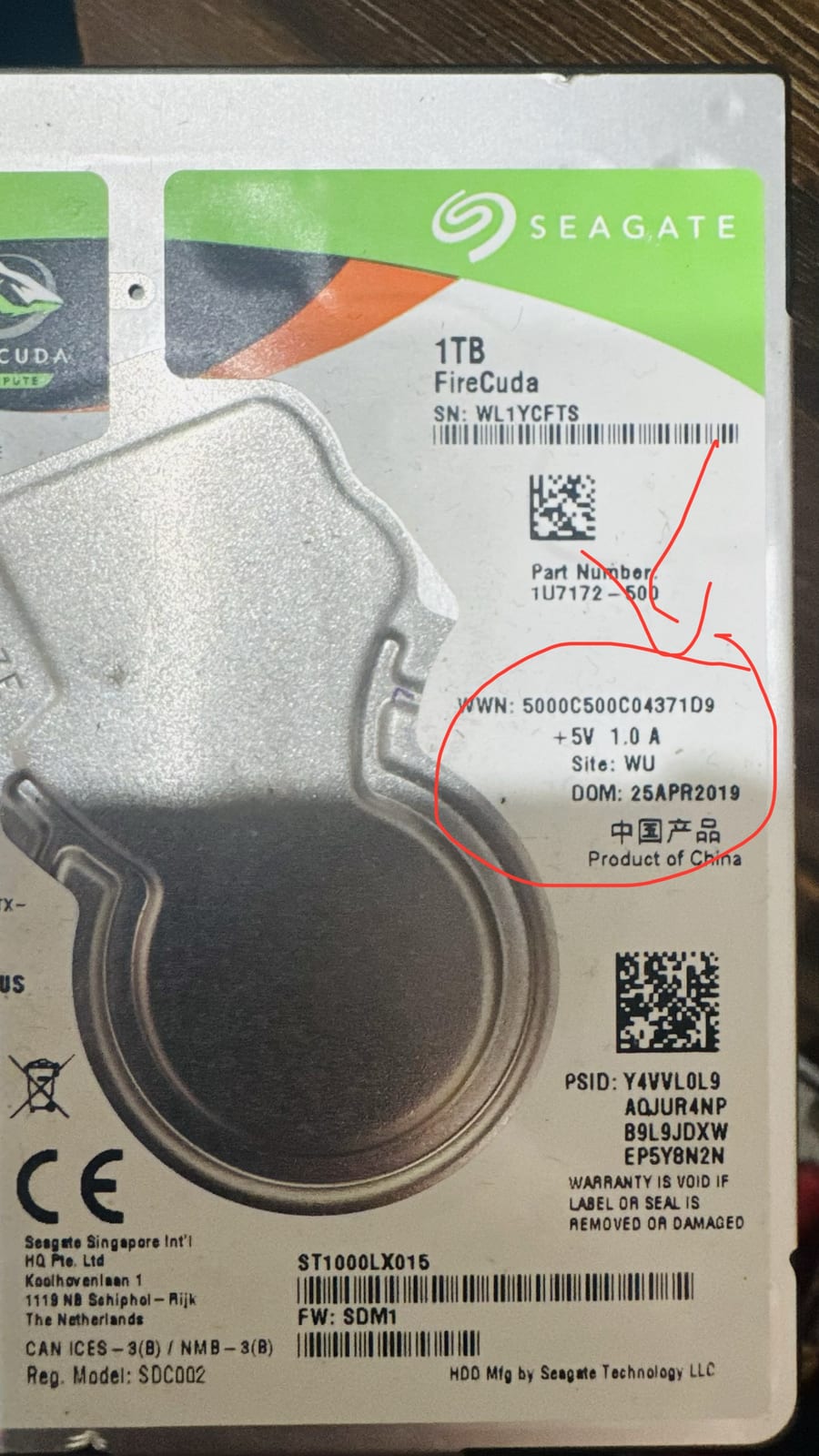
- Identified the drive as a Seagate FireCuda 1TB (ST1000LX015) from 2019
- Read the SMART data, which showed pending and reallocated sectors and a high error rate
- Confirmed the noises matched a mechanical fault developing in the drive
- Stopped normal use immediately to avoid making the failure worse
Repair work completed
- Connected the drive through a write-blocked recovery setup to avoid further wear
- Imaged the healthy areas of the drive first, then targeted the weak sectors
- Recovered the customer's documents, photos and other important files
- Verified the recovered data opened correctly
- Set the customer up with a replacement drive and a backup plan
Outcome
The customer's files were recovered before the drive failed for good. The laptop was fitted with a new drive and a simple backup routine so a single drive failure cannot cause the same scare again.
Questions about this type of repair
My hard drive is making a clicking noise. What should I do?
Stop using it straight away. Clicking or buzzing usually means a mechanical fault, and every extra minute of use risks losing more data. Power it down and get it looked at before the drive fails completely.
Can data be recovered from a drive that still works sometimes?
Often yes, and the odds are much better while the drive still spins up. Recovery is done by imaging the good areas first, which is why acting early matters.
How do I avoid this happening again?
Keep at least two copies of anything important, for example one on the computer and one in cloud or external backup that updates automatically.